Contents
When I joined my current company as a fresh graduate, the team let me set up and own our entire infrastructure on Kubernetes, from scratch. I wrote my first Kubernetes note in November 2025. Three and a half weeks later, our graph database was running in production on EKS.
Since then the cluster has grown from 2 Karpenter node pools to 31, spanning memory-optimised, NVMe, GPU and Graviton machines, and to about 155 nodes at the last count. It runs the databases we self-host (a graph database, a vector database and ClickHouse, each through its operator), Temporal, the monitoring stack (Prometheus, Grafana, and Vector shipping logs into ClickHouse), ArgoCD for GitOps, and our application and model servers. I was the only infrastructure engineer until May 2026, when a second one joined.
The hardest and most interesting part was running stateful databases on a shared cluster for many tenants: namespace isolation, resource limits, volume claims, and making sure one tenant’s data never reaches another’s workload. Each tenant gets its own database cluster. In four months our GitOps automation created about 430 of them and deleted 257, and every deleted one left its disks behind.
Kubernetes has a lot of vocabulary, and most of it only clicks once something breaks. After my first four months I posted a list of the things you should know on X. This post is that list, cleaned up and in the order I’d learn it.
What this post is, and what comes next
This post is a map. Every term gets one line: what it is, and where it bit me in production if it did. It won’t make you fluent, but after reading it you’ll recognise most of the words in a Kubernetes design doc or incident channel.
The rest of this series takes one area at a time, with the manifests, the commands and the things that broke. The full plan is at the end.
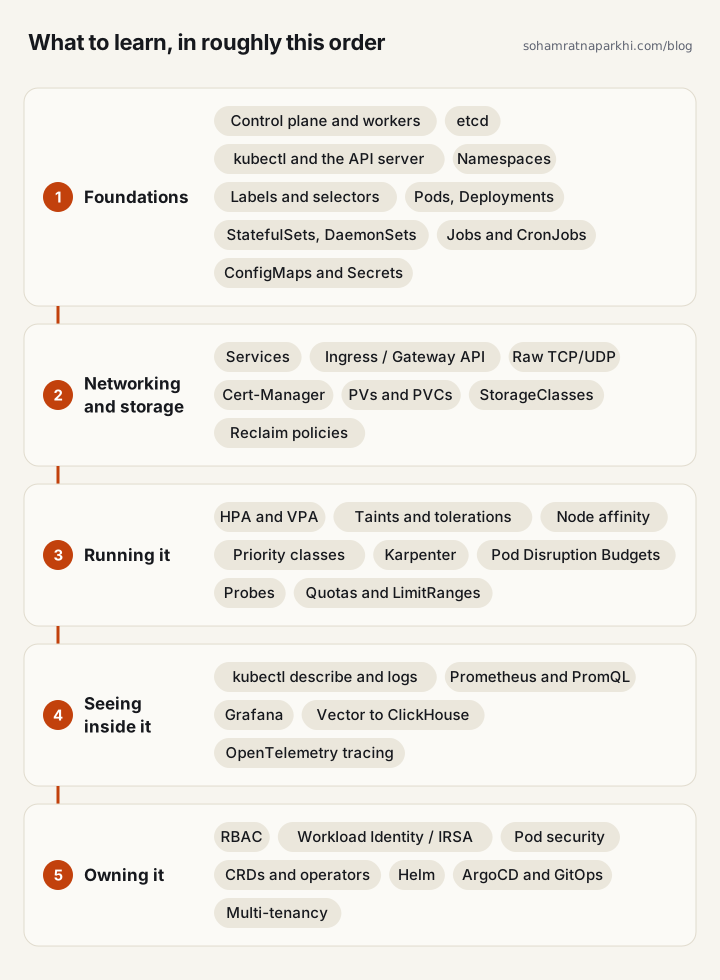
1. Foundations
- Control plane and worker nodes. The control plane (API server, scheduler, controllers, etcd) decides what runs where. Worker nodes run your containers.
- Managed Kubernetes (EKS, GKE, AKS). The cloud provider runs the control plane. You manage the worker nodes and everything on them.
- etcd. The key-value store that holds the cluster’s state. On managed Kubernetes the provider runs and backs it up.
- kubectl and the API server. Every change, whether from you or from a controller, is an API call. kubectl is one client of that API.
- Namespaces. Groups of resources. Use them to separate environments or tenants and to scope quotas and permissions.
- Labels and selectors. Key-value tags on objects. Services, Deployments and policies use selectors to find the Pods they apply to.
- Pods. The smallest unit you run: one or more containers sharing a network and volumes. Set CPU and memory requests and limits on every one. Sidecar and init containers live here too.
- ReplicaSets. Keep N copies of a Pod running. You rarely create them yourself; Deployments do.
- Deployments. Run stateless apps, with rolling updates, rollbacks and a replica count.
- StatefulSets. For databases and anything that needs a stable identity, an ordered rollout and its own persistent volume per replica.
- DaemonSets. One Pod on every node. Used for node-level agents such as log shippers and monitoring.
- Jobs and CronJobs. Run a task to completion, once or on a schedule.
- ConfigMaps. Non-secret configuration such as app config and feature flags, passed in as environment variables or files.
- Secrets. DB credentials, API keys and registry credentials. They are only base64-encoded by default (encryption at rest is opt-in), so for anything important use an external manager (Vault, External Secrets Operator, AWS Secrets Manager). See the good practices for Secrets.
2. Networking and storage
- Services. A stable address in front of a changing set of Pods. ClusterIP works inside the cluster, NodePort opens a port on every node, and LoadBalancer provisions the cloud’s load balancer.
- Ingress and Gateway API. HTTP routing by host and path, plus TLS termination. Gateway API is the newer, more expressive successor to Ingress.
- Raw TCP and UDP. Non-HTTP protocols, such as a database’s own wire protocol, need TCP routing, for example a TransportServer on the NGINX ingress controller.
- Stunnel. Wraps a plain TCP connection in TLS, for encrypted access to a database from outside the cluster.
- Cert-Manager. Issues and renews TLS certificates (Let’s Encrypt or an internal CA) and plugs into Ingress. Easy to overlook until a cert expires in production.
- PersistentVolumes and PersistentVolumeClaims. A PVC is a Pod’s request for storage. A PV is the actual disk that satisfies it.
- StorageClasses. Describe a type of disk so PVs can be created on demand (dynamic provisioning). On EKS that’s the EBS CSI driver.
- Reclaim policies. Decide whether a disk is deleted or kept when its claim goes away. Define them early, along with StatefulSets’ PVC retention policy, or end up with hundreds of orphaned EBS volumes. I had over 500.
3. Running it
- Horizontal Pod Autoscaler. Adds or removes replicas based on CPU, memory or custom metrics.
- Vertical Pod Autoscaler. Adjusts a Pod’s CPU and memory requests to what it actually uses.
- Taints, tolerations and node affinity. Keep Pods off certain nodes, let specific Pods onto them, and prefer or require particular nodes. I use them to pin memory-heavy workloads to specific instance types and to keep database Pods from landing on the same node.
- Priority classes. Decide which Pods are evicted first when a node runs short of resources.
- Karpenter. Adds right-sized nodes quickly when Pods can’t be scheduled and consolidates underused ones. It keeps availability-zone placement, so an evicted database Pod can reattach its EBS volume in the same zone.
- Pod Disruption Budgets. Limit how many replicas can be down at once while nodes are drained or consolidated. Define them, and your consolidation and reclaim policies, before Karpenter starts moving things.
- Liveness, readiness and startup probes. Liveness restarts a stuck container. Readiness removes it from its Service until it can serve. Startup gives slow starters time before the other two begin.
- ResourceQuotas and LimitRanges. Cap what a namespace can use in total, and set defaults and bounds for each container.
4. Seeing inside it
- kubectl describe. Shows exactly why a Pod is Pending, in CrashLoopBackOff, OOMKilled or out of CPU. The docs on debugging Pods walk through each case.
- kubectl logs. The container’s own output.
- Prometheus and PromQL. Prometheus scrapes and stores metrics at scale. PromQL is essentially SQL for your metrics.
- Grafana. Turns those metrics into dashboards and alerts.
- Log aggregation. Ship logs off the nodes into one store you can query. Vector into ClickHouse works very well.
- Distributed tracing. OpenTelemetry follows one request across services so you can see where the time goes.
5. Owning it
- RBAC. Roles and ClusterRoles define what can be done. RoleBindings grant them to users and service accounts.
- Workload Identity and IRSA. Map Kubernetes service accounts to cloud IAM roles, so Pods never hold static cloud credentials.
- Pod Security Standards and SecurityContext. Stop containers from running as root or with more privileges than they need.
- CRDs and operators. ArgoCD, Prometheus, Cert-Manager and database operators are custom resources plus a controller that acts on them, which makes Kubernetes an extensible control plane. Operators handle failover, backup schedules and rolling upgrades for stateful systems that would otherwise need manual work.
- Helm. Templated manifests with versioned releases. We wrap our database operators in our own internal charts, with service monitors, ingress and multi-tenancy config built in.
- GitOps with ArgoCD. Git is the source of truth. ArgoCD syncs the cluster to it, detects drift and rolls back. Pair it with CI for image versioning, registries, and blue/green or canary deploys.
- Multi-tenancy. Namespace isolation, resource limits and per-tenant volume claims, so one tenant’s load or data never touches another’s.
Tools worth trying
- k9s and Lens for seeing what’s running.
- Kubecost or OpenCost for cost per namespace.
- Velero for backup and disaster recovery.
- Telepresence for developing locally against a real cluster.
How to learn it
Run KinD locally, then self-host something you actually care about. You’ll hit every concept on this page under real pressure, and it sticks far better than any tutorial. Claude becomes your best friend.
I’ll always be grateful my team let a fresh BTech grad deploy and fully own the entire Kubernetes stack alone. There were plenty of 2 am mood swings between “im ngmi” and “we made it”, but it gave me two years of corporate experience in three to four months. There’s still lots to learn and lots to break.
Coming next in this series
Each part takes one section of this map and goes deep, with the configs and the failures:
- This map.
- Workloads: from Pods to StatefulSets, and why databases need the latter.
- Networking: Services, Ingress, Gateway API and raw TCP.
- Storage: volumes, StorageClasses, and how I ended up with 500 orphaned EBS volumes.
- Scheduling and autoscaling: requests and limits, taints, Karpenter and disruption budgets.
- Observability: probes, Prometheus, Grafana, and logs from Vector into ClickHouse.
- Security: RBAC, IRSA and pod security.
- Operators, Helm and GitOps.
- Multi-tenancy: running stateful databases for many tenants on one cluster.
Further reading
- Kubernetes concepts: the official docs, and the best single reference for every term above.
- Borg, Omega, and Kubernetes: Google’s paper on the systems Kubernetes came from, and why it’s built around controllers and labels.
- Kubernetes the Hard Way: Kelsey Hightower’s guide to building a cluster by hand, one component at a time.
- EKS Best Practices Guide: AWS’s guide to security, reliability, networking, autoscaling and cost on EKS.
- DevOps Directive Kubernetes course: a free, hands-on course from a first cluster through Helm and GitOps.
If you’d rather start with something hands-on, my 2023 post on deploying two microservices to Kubernetes walks through a first deployment end to end.
This post started as a thread on X.